Home Page
The home page is the first page most visitors see when they land on your store. Fragrance Shop ships with a ready-made stack of sections—hero slideshow, featured products, testimonials, and more—that you can reorder, remove, or replace in the theme editor.
Storefront preview
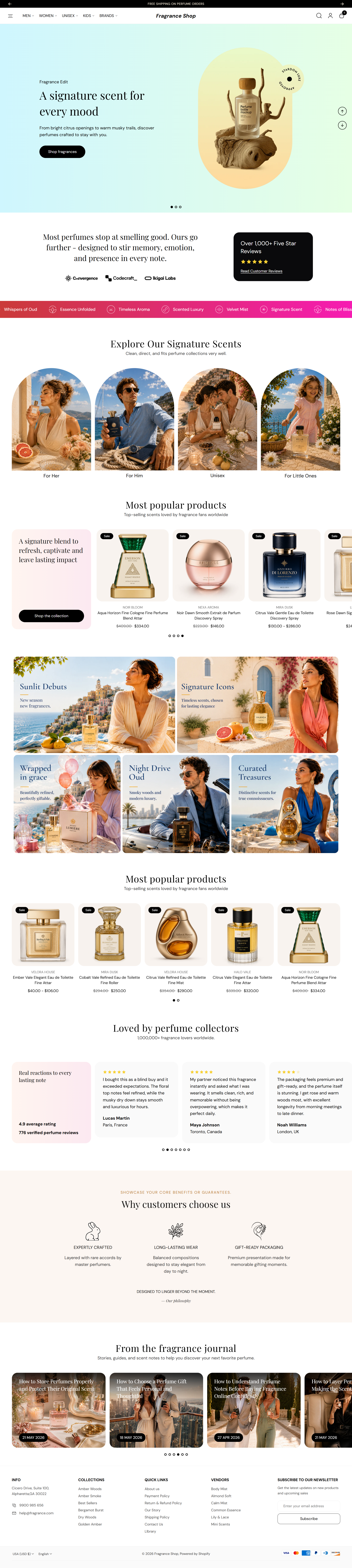
Storefront → Home page
Sections on this page
Each section below has its own settings guide. Click a link to see screenshots and step-by-step help for that section.
- Hero slideshow — full-width image slides with headlines and buttons. Open guide
- Reviews and logos — star rating, review quotes, and brand logos. Open guide
- Scrolling text — moving text strip for promos or brand messages. Open guide
- Image banner grid — row of image tiles linking to collections or pages. Open guide
- Editorial product feature — spotlight one product with large imagery. Open guide
- Image gallery — grid of lifestyle or product images. Open guide
- Featured collection — product row from a collection you pick. Open guide
- Testimonials — customer quotes in a slider. Open guide
- Product benefits — icon row for shipping, returns, or quality notes. Open guide
- Blog posts — latest articles from your blog. Open guide
Drag sections to change their order. Use Add section at the bottom of the template to insert anything else from the theme library.