Theme Settings

Theme Settings

Theme Settings are the global controls for your Fragrance Shop storefront. They manage your logo, colors, typography, buttons, product cards, cart, search, and other sitewide choices.

Theme Settings

Brand identity

Set your store logo, how tall it looks on desktop and mobile, the store name color when no logo is uploaded, and the small icon in browser tabs.

Your logo or store name appears in the header on every page. The browser icon shows in tabs and bookmarks.

Upload a logo when you have one, or use your store name from Shopify admin until you are ready. Set logo height separately for desktop and mobile. Style the store name and broader look in Colors and schemes.

On your store

Your logo (or store name) appears in the center of the header on desktop, with navigation and utility icons on either side.

Storefront header showing the Fragrance Shop logo centered between navigation and search, account, and cart icons

Storefront → header → logo and store name

Store name fallback

Store name color

Sets the color of your store name in the header when no logo image is uploaded. Default color: #000000.

Usage

  • Only applies when Logo image is empty
  • Pick a color that matches your brand and Colors and schemes
  • The name shown comes from Shopify Admin → Settings → General → Store details → Store name

Where it shows on the storefront

  • Storefront → header → store name text (only when no logo image is uploaded)

Browser icon

Favicon image

Upload a small square icon for browser tabs, bookmarks, and shortcuts.

Usage

  • Use a square image (same width and height)
  • 32×32 px minimum; 48×48 px for sharper tabs on high-resolution screens
  • 180×180 px if you want a stronger icon when customers save your site to their home screen
  • Simple shapes and high contrast read best at small sizes
  • See Shopify’s theme editor settings guide for favicon tips

Where it shows on the storefront

  • Browser tab icon, bookmarks, and shortcuts (not shown inside your store layout)
  • Preview the header on desktop and mobile—logo height should feel balanced, not cramped
  • If you use store name fallback, confirm the name in Settings → General → Store details is correct
  • Open your store in a new browser tab and check the favicon appears
  • Remove the logo temporarily in the editor to preview store name color, then add the logo back

Wide logos are controlled by height, not width. Adjust Desktop logo height and Mobile logo height until the header looks right.

The theme shows the name from Shopify admin, not from the theme editor. Update Settings → General → Store details → Store name, then refresh the theme preview.

Upload a square PNG at least 48×48 px with a simple mark. Busy details disappear at tab size.

Theme Settings

Border radius

Set four global corner sizes for your whole store. Sections and templates choose a preset name—not individual pixels—so rounded corners stay consistent sitewide.

Define four global corner sizes—Small, Medium, Large, and Extra large—using the sliders in this panel. These pixel values apply everywhere that preset is used.

In sections and templates, controls such as Corner radius or Radius preset choose a size—they do not set pixels on their own. Update a preset here to sharpen or soften corners across buttons, cards, images, and banners at once.

Radius presets

Shared corner sizes used across the theme. Sections choose a preset name so corners stay consistent when you change a value here.

Small radius

The pixel size for the Small preset. Used for subtle rounding on small elements. Default: 0 px · You can choose 0 to 24 px

Usage

  • Move the slider to set how rounded corners look when a section picks Small radius
  • You do not set pixels inside each section—only which preset name that section should use

Medium radius

The pixel size for the Medium preset. Used for cards, inputs, and common elements. Default: 8 px · You can choose 0 to 24 px

Usage

  • Move the slider to update the most common corner size on your store
  • Many product cards and form fields default to this preset
  • Changing this value updates every block assigned to Medium radius sitewide

Large radius

The pixel size for the Large preset. Used for larger cards and media blocks. Default: 16 px · You can choose 0 to 24 px

Usage

  • Move the slider when you want featured rows, larger tiles, or media blocks to feel softer
  • Sections pick Large radius in the editor; this setting supplies the pixels

Extra large radius

The pixel size for the Extra large preset. Used for banners, featured images, and large containers. Default: 24 px · You can choose 0 to 24 px

Usage

  • Move the slider for hero banners, full-width promos, and large image frames
  • Use sparingly so extra-large rounding stays special and does not overpower product detail
Theme Settings

Colors and schemes

Color schemes are reusable palettes for your storefront—backgrounds, text, buttons, forms, and product swatches in one place. Scheme 1 drives sitewide colors in Fragrance Shop; duplicate schemes when you need a second look, and assign a scheme per section where the theme editor offers Color scheme. Use strong contrast so text and buttons stay readable.

Each color scheme sets your page background, text, buttons, form fields, and product swatches in one place. Start with Scheme 1—the default palette for your whole store.

Button colors live here; button size, padding, and corners are under Buttons. Duplicate a scheme when you want a different look for a footer band, promo row, or campaign. Keep strong contrast between background, text, and primary buttons so your store stays easy to read on every device.


On your store

Sections and the page body pull background, text, and button colors from the scheme assigned in the theme editor—or from Scheme 1 for global styles.

Color schemes

Open a scheme (start with Scheme 1) to edit every color group below. Each group controls one part of your storefront—together they form a reusable palette you can assign to sections.

Page colors

Page background sets the default surface color for your store, including the main body background customers see behind every page.

Page background

The main background color for your store. Fragrance Shop applies it to the page body and as the base surface behind content. Default color: #FFFFFF.

Usage

  • Sets the sitewide canvas—pair with Body text so paragraphs stay readable
  • Light neutrals (#FFFFFF, soft cream) suit editorial fragrance and beauty layouts
  • Dark backgrounds need lighter body and heading text in the same scheme

Where it shows on the storefront

  • Storefront → page body background on every template
  • Storefront → section areas that inherit this scheme’s background

Text colors

Control default text for this scheme.

Body text

The default text color for your website—used for most paragraphs, descriptions, and general copy. Default color: #404040.

Usage

  • This is the color customers read most—choose a soft black or charcoal, not pure black, for long beauty copy
  • Check contrast against Page background (aim for comfortable reading on product and blog pages)

Secondary text

A lower-priority text color for supporting details—secondary to body text in the visual hierarchy. Default color: #767676.

Usage

  • Use for metadata, hints, and de-emphasized labels without hiding important information
  • Should be lighter or softer than Body text but still readable on your page background

Heading text

The text color for headings h1 through h6—section titles, product names in cards, and page titles that use heading styles. Default color: #000000.

Usage

  • Often darker or stronger than body text so titles stand out
  • Works with typography sizes under Typography—color is set here, size there

Where it shows on the storefront

  • Storefront → section headings, product card titles, blog post titles, and template page titles
  • Storefront → any heading tag (h1–h6) using the scheme heading color

Divider colors

One shared border color for dividers and lines across the theme—use it to lighten or darken every border consistently.

Divider and border

The common color for borders, rules, and separators. Changing it updates every component that uses the theme’s shared border variable. Default color: #EDEDED.

Usage

  • Lighten for airy, minimal layouts; darken slightly for stronger grid lines on collection pages
  • Align with form and card borders so the store feels cohesive
  • Avoid borders that disappear on Page background—keep a visible edge

Where it shows on the storefront

  • Storefront → cart dividers, collection cards, blog cards, and facet panels
  • Storefront → horizontal rules between rows, compare modal lines, and similar separators

Primary button

Colors for primary buttons—the main actions customers take (Add to cart, Checkout, and strong CTAs). Size and padding are under Buttons.

Background

Sets the fill color for primary call-to-action buttons—the main buttons customers tap to buy or move forward. Default color: #000000.

Usage

  • Pick a color with strong contrast against your Page background and Text colors
  • Dark fills on light pages work well for fragrance and beauty stores
  • Match your brand accent if primary buttons should feel unmistakably “on brand”

Where it shows on the storefront

  • Storefront → Add to cart, Checkout, and other primary buttons
  • Newsletter submit, contact form submit, and strong section CTAs that use the primary style

Text

Sets the label color on primary buttons so button text stays readable on the button fill. Default color: #FAFAFA.

Usage

  • Use light text on dark button backgrounds, or dark text on light fills
  • Check contrast with Background in the same group—labels should be easy to read at a glance

Where it shows on the storefront

  • Storefront → text inside primary buttons (Add to cart, Checkout, and similar)

Border

Sets the outline color around primary buttons when the theme shows a visible border. Default color: #000000.

Usage

  • Match Background for a solid look, or use a contrasting outline for a framed button
  • Keep border and fill distinct enough that the button edge stays clear on busy backgrounds

Where it shows on the storefront

  • Storefront → border around primary buttons

Hover background

Sets the button fill color when a customer hovers over or focuses a primary button. Default color: #FFFFFF.

Usage

  • Often inverted from the default fill (for example dark → light) for clear feedback
  • Preview hover on desktop—the change should feel intentional, not accidental

Where it shows on the storefront

  • Storefront → primary button fill on hover and keyboard focus

Hover text

Sets the label color on primary buttons during hover or focus. Default color: #000000.

Usage

  • Pair with Hover background so labels stay readable when the fill changes
  • If hover inverts the button colors, invert the text color too

Where it shows on the storefront

  • Storefront → primary button label on hover and keyboard focus

Hover border

Sets the outline color on primary buttons during hover or focus. Default color: #000000.

Usage

  • Align with Hover background for a cohesive hover state
  • Use a slightly stronger outline if hover only changes the border

Where it shows on the storefront

  • Storefront → primary button border on hover and keyboard focus

Secondary button

Colors for secondary buttons—outlined or softer actions that sit beside primary CTAs (View all, Learn more, alternate paths).

Background

Sets the fill color for secondary buttons—outlined or softer actions that support the primary CTA. Default color: #FFFFFF.

Usage

  • Transparent or light fills are common so secondary buttons feel less dominant than primary
  • Works well for “View all”, “Learn more”, or alternate paths on the same row as a primary button

Where it shows on the storefront

  • Storefront → secondary-style buttons (outlined or soft-fill actions)
  • Collection “View all”, slideshow secondary actions, and paired CTAs beside primary buttons

Text

Sets the label color on secondary buttons. Default color: #000000.

Usage

  • Dark text on light or transparent backgrounds is typical
  • Ensure labels stay readable against the Page background behind the button

Where it shows on the storefront

  • Storefront → text inside secondary buttons

Border

Sets the outline color for secondary buttons—often the most visible part of this style. Default color: #000000.

Usage

  • Use a clear outline when the fill is transparent or matches the page
  • Match or complement Divider and border for a consistent line weight across the store

Where it shows on the storefront

  • Storefront → border around secondary buttons

Hover background

Sets the fill when customers hover over or focus a secondary button. Default color: #000000.

Usage

  • A subtle fill on hover helps secondary buttons feel interactive without overpowering primary CTAs

Where it shows on the storefront

  • Storefront → secondary button fill on hover and keyboard focus

Hover text

Sets the label color on secondary buttons during hover or focus. Default color: #FFFFFF.

Usage

  • Adjust when Hover background darkens or lightens the button area

Where it shows on the storefront

  • Storefront → secondary button label on hover and keyboard focus

Hover border

Sets the outline color on secondary buttons during hover or focus. Default color: #000000.

Usage

  • Can stay the same as the default border or deepen slightly on hover for feedback

Where it shows on the storefront

  • Storefront → secondary button border on hover and keyboard focus

Tertiary button

Colors for tertiary (pill-style) buttons—compact text actions in banners, rich text, and editorial rows.

Background

Sets the fill for tertiary (pill-style) buttons—compact text actions used in editorial sections. Default color: #000000.

Usage

  • Pill buttons often use a solid fill or a subtle tint that differs from primary and secondary
  • Keep tertiary fills lighter or smaller in visual weight than primary CTAs

Where it shows on the storefront

  • Storefront → tertiary / pill-style buttons in banners, rich text, and promotional rows
  • Compact “Shop now” or tag-style actions that are not the main Add to cart button

Text

Sets the label color on tertiary buttons. Default color: #FFFFFF.

Usage

  • Balance with Background for readable pill labels on any section background

Where it shows on the storefront

  • Storefront → text inside tertiary (pill-style) buttons

Border

Sets the outline on tertiary buttons when a border is shown. Default color: #000000.

Usage

  • Optional for pill styles—some merchants match fill and border for a solid capsule look

Where it shows on the storefront

  • Storefront → border around tertiary buttons

Hover background

Sets the fill on tertiary buttons during hover or focus. Default color: #FFFFFF.

Usage

  • Lighten or invert slightly so pill buttons respond clearly without looking like primary CTAs

Where it shows on the storefront

  • Storefront → tertiary button fill on hover and keyboard focus

Hover text

Sets the label color on tertiary buttons during hover or focus. Default color: #000000.

Usage

  • Pair with Hover background when the pill fill changes on hover

Where it shows on the storefront

  • Storefront → tertiary button label on hover and keyboard focus

Hover border

Sets the outline on tertiary buttons during hover or focus. Default color: #000000.

Usage

  • Use when tertiary buttons rely on a visible edge rather than only a fill change

Where it shows on the storefront

  • Storefront → tertiary button border on hover and keyboard focus

Arrow button

Colors for arrow buttons—tertiary-style CTAs with a directional icon, common in hero slideshows and image banners.

Background

Sets the fill for arrow buttons—tertiary-style buttons that include a directional icon (common in hero and slideshow sections). Default color: #000000.

Usage

  • Often matches or complements Tertiary button colors with a distinct arrow treatment
  • Strong fills help the arrow CTA stand out on photography or video slides

Where it shows on the storefront

  • Storefront → buttons with an arrow icon (hero slideshow, image banners, promotional slides)
  • “Shop the collection” and similar slide CTAs that show a trailing arrow

Text

Sets the label and arrow icon color on arrow buttons. Default color: #FFFFFF.

Usage

  • Applies to both the button text and the arrow glyph—keep contrast with Background

Where it shows on the storefront

  • Storefront → text and arrow icon on arrow-style buttons

Border

Sets the outline on arrow buttons when a border is visible. Default color: #FFFFFF.

Usage

  • Use a light border on dark slides or a dark border on light slides for definition

Where it shows on the storefront

  • Storefront → border around arrow buttons

Hover background

Sets the fill on arrow buttons during hover or focus. Default color: #FFFFFF.

Usage

  • Invert or brighten on hover so slideshow CTAs feel responsive over imagery

Where it shows on the storefront

  • Storefront → arrow button fill on hover and keyboard focus

Hover text

Sets the label and arrow color during hover or focus. Default color: #000000.

Usage

  • Update together with Hover background when the slide CTA inverts on hover

Where it shows on the storefront

  • Storefront → arrow button text and icon on hover and keyboard focus

Hover border

Sets the outline on arrow buttons during hover or focus. Default color: #000000.

Usage

  • Optional accent—helpful when the button sits on busy photography

Where it shows on the storefront

  • Storefront → arrow button border on hover and keyboard focus

Form fields

Background, text, and border colors for text inputs and text areas in this scheme.

Background

Sets the background fill inside text inputs and text areas (contact forms, search, cart notes, and account fields). Default color: #FFFFFF.

Usage

  • Use white or a soft tint that contrasts with Page background
  • Avoid fills that match the page exactly—customers should see where to type

Where it shows on the storefront

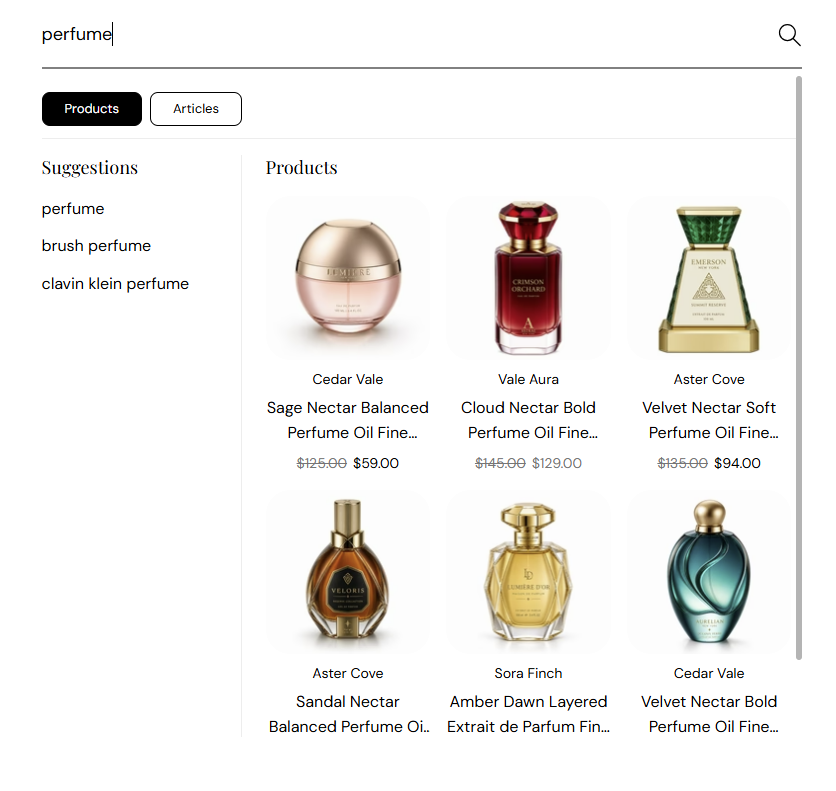
  • Storefront → contact form, newsletter signup, search field, cart note, and customer account inputs

Text

Sets the color of text customers type into form fields. Default color: #000000.

Usage

  • Dark text on light field backgrounds is easiest to read
  • Should be clearly darker or lighter than the field Background

Where it shows on the storefront

  • Storefront → typed text inside inputs and text areas

Border

Sets the outline around form fields so inputs have a visible edge. Default color: #EDEDED.

Usage

  • Slightly darker than the field background defines the box without feeling heavy
  • Can align with Divider and border for a unified line color across the store

Where it shows on the storefront

  • Storefront → borders around text inputs, text areas, and similar fields

Dropdowns

Colors for select menus and dropdown controls (sort, and similar).

Background

Sets the background of dropdown and select menus (sort controls, country/language selectors, and similar). Default color: #FFFFFF.

Usage

  • Match or complement Form fields → Background so selects feel part of the same system

Where it shows on the storefront

  • Storefront → collection sort menus, localization dropdowns, and other select-style controls

Text

Sets the text color shown inside dropdowns and select menus. Default color: #000000.

Usage

  • Keep readable against the dropdown Background

Where it shows on the storefront

  • Storefront → labels and options inside dropdown menus

Border

Sets the outline around dropdown and select fields. Default color: #EDEDED.

Usage

  • Helps dropdowns stand out on busy collection and product layouts
  • Lighten or darken this color to make menu edges softer or sharper sitewide

Where it shows on the storefront

  • Storefront → border around dropdown and select controls

Product option buttons

Colors for unselected variant pills on the product page—size, scent, or other options before the customer picks one. Works for text labels and swatches.

Background

Sets the fill for unselected product option buttons—size, scent, or other variant pills before the customer chooses. Default color: #FFFFFF.

Usage

  • Light fills with a visible border help shoppers scan options on the product page
  • Works for text labels and swatch-style options (color or image chips)

Where it shows on the storefront

  • Storefront → product page → unselected variant pills and option swatches
  • Featured product sections that show variant pickers

Text

Sets the label color on unselected variant options. Default color: #000000.

Usage

  • Should stay readable on the unselected Background fill

Where it shows on the storefront

  • Storefront → text on unselected variant pills (for example “50 ml”, “100 ml”)

Border

Sets the outline on unselected variant pills so each option has a clear tap target. Default color: #CECECE.

Usage

  • Slightly stronger than the fill so pills read as buttons, not plain text
  • Pair with Selected border so chosen options feel clearly different

Where it shows on the storefront

  • Storefront → border around unselected variant pills and swatches

Selected Product option buttons

Colors for the selected variant after the customer picks an option—the active pill or swatch on the product page.

Selected background

Sets the fill for the variant option the customer has selected (active swatch or pill). Default color: #000000.

Usage

  • Often a dark fill with light text, or the inverse of unselected pills
  • Make selected state obvious at a glance on mobile product pages

Where it shows on the storefront

  • Storefront → product page → selected variant pill or swatch background

Selected text

Sets the label color on the selected variant option. Default color: #FFFFFF.

Usage

  • Contrast strongly with Selected background
  • Check selected text on both text-only and image swatches

Where it shows on the storefront

  • Storefront → label on the active variant pill (size, scent, color name, and similar)

Selected border

Sets the outline on the selected variant pill. Default color: #000000.

Usage

  • Can match the selected fill for a solid chip, or use a ring-style border for swatches
  • Helps selected color/image swatches stand out from unselected neighbors

Where it shows on the storefront

  • Storefront → border or ring around the selected variant pill or swatch
Theme Settings

Typography

Choose fonts and default sizes for body copy, h1–h6 headings, section titles, and template page titles. Text colors are set under Colors and schemes—this group controls typefaces and scale only.

Typography controls fonts and sizes—not text colors. Link, body, and heading colors come from Colors and schemes.

Start with Fonts and Body text size, then tune heading levels, section titles, and template page titles so beauty and fragrance copy stays readable on every screen.

Fonts

Pick the typefaces for your store. Body font applies sitewide; Heading font applies to all h1–h6 tags that use the heading family.

Body font

The font family for your whole website—paragraphs, UI labels, buttons, and most general content. Theme default: DM Sans

Usage

  • Choose a highly readable font for product descriptions and long editorial copy
  • Sans-serif fonts work well for beauty and fragrance stores on mobile
  • Pair with a distinctive Heading font so titles feel editorial, not generic

Where it shows on the storefront

  • Storefront → body text, navigation labels, form fields, and most non-heading copy
  • Storefront → default font family on every page

Heading font

The font family for heading tags h1 through h6—titles that use the theme heading styles. Theme default: Playfair Display

Usage

  • Serif or display fonts add a luxury feel for fragrance and beauty brands
  • Keep contrast with Body font—headings should feel intentional, not the same as paragraphs
  • Sizes for each level are set under Heading text below

Where it shows on the storefront

  • Storefront → h1–h6 headings and elements that use the heading font family
  • Storefront → section titles when they inherit global heading typography

Body text

The default text size for general website content—paragraphs, descriptions, and UI copy that follow body styles.

Body text size

Sets the common font size used across your store for body content. Default: 16 px · You can choose 12 to 22 px

Usage

  • 16 px is a comfortable default for product and blog reading
  • Increase slightly if your audience prefers larger text; decrease for dense layouts
  • Heading sizes are controlled separately—this does not change h1–h6

Where it shows on the storefront

  • Storefront → default paragraph and body copy sitewide
  • Storefront → product descriptions, cart lines, blog text, and general UI copy

Heading text

Set a default size for each heading level (H1 through H6). Keep H1 largest and step down through H6 so page hierarchy stays clear. Font family comes from Heading font above; color comes from Colors and schemes. Headings scale down on mobile automatically.

Section headings

On your store

Section title and subtitle on collection blocks, featured rows, and other sections that use global heading styles.

Storefront section heading Explore Our Signature Scents with a subtitle below

Storefront → section title and subtitle

Many sections show a heading and subtitle row (for example featured collections or testimonials). Set default size and color when the section uses global typography—not its own overrides.

Section heading size

Default font size for section titles that use the global section heading style. Default: 40 px · You can choose 20 to 42 px

Usage

  • Often matches or sits near your H1/H2 scale for consistent section rhythm
  • Featured collection, blog posts, and promotional rows commonly use this size
  • Some sections can override title size in their own settings—this is the theme default

Where it shows on the storefront

  • Storefront → section title above product grids, image banners, and similar blocks
  • Storefront → rows that use global section title typography

Section subtitle size

Default font size for the line under a section title. Default: 18 px · You can choose 14 to 20 px

Usage

  • Keep subtitles smaller than the section heading for clear hierarchy
  • Works well for supporting lines (“Discover our bestsellers”, seasonal messaging, and similar)

Where it shows on the storefront

  • Storefront → subtitle text directly under section titles

Section heading color

Default text color for section titles when global typography applies. Default color: #000000.

Usage

  • Separate from Heading text color in color schemes—this targets section title rows
  • Use strong contrast on light section backgrounds
  • Individual sections may set their own title color; this is the fallback

Where it shows on the storefront

  • Storefront → section heading text on homepage and inner pages

Section subtitle color

Default text color for section subtitles. Default color: #000000.

Usage

  • Can match the title or use a softer tone if you adjust opacity in section settings
  • Pair with Section subtitle size for balanced title blocks

Where it shows on the storefront

  • Storefront → subtitle line under section titles

Page headings

On your store

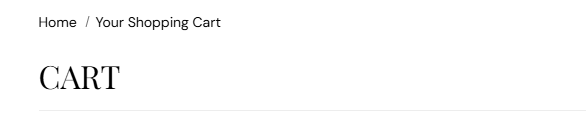
Large page titles on templates such as cart, collection, and blog—with breadcrumbs above when enabled.

Storefront cart page with breadcrumb Home slash Your Shopping Cart and large CART page title

Storefront → template page title (cart example)

Each template page has a main title—the large heading at the top of collection, cart, blog, and similar pages. Control its size and letter style here.

Page heading size

Default size for template page titles (the main heading on the page, not section titles). Default: 32 px · You can choose 20 to 40 px

Usage

  • Sets how prominent “Cart”, “Collections”, or blog index titles feel
  • Works with Page heading style for uppercase editorial looks
  • Breadcrumb lines above the title use separate styles

Where it shows on the storefront

  • Storefront → main page title on collection, cart, blog, search, and standard pages
  • Storefront → template headers that use the global page heading size

Page heading style

Choose whether template page titles use normal letters or ALL CAPS. Default: Uppercase

Usage

  • Uppercase — strong editorial look (for example CART, COLLECTIONS)
  • Normal — sentence case for a softer, boutique feel
  • Preview cart and collection pages after switching—long titles wrap differently in uppercase

Where it shows on the storefront

  • Storefront → template page titles (collection, cart, blog, and similar)
Theme Settings

Layout and spacing

Control the maximum width of your store’s main content container on desktop and large tablets—the wrapper that holds sections, product grids, and page content.

Sets how wide your store’s main content area can grow on large screens. Product grids, text, and images share this maximum width.

Section padding is controlled separately in each section. Choose a narrower width for more side margin, or a wider width for a gallery-style layout.

Container width

Sets the maximum width of your store’s main content wrapper on desktop and large tablets.

Maximum page width

Limits how wide the centered content column can grow on large screens. Default: 1600 px · You can choose 1450 to 1800 px (steps of 50 px).

Usage

  • Move the slider in steps of 50 px to find a width that suits your brand
  • 1450–1500 px — more side margin, focused reading width
  • 1600 px — balanced default for product grids and editorial rows
  • 1700–1800 px — wider gallery feel; preview collection and homepage rows after changing

Where it shows on the storefront

  • Storefront → centered content column on desktop and large tablet
  • Storefront → product grids, rich text, and sections inside the page wrapper
Theme Settings

Buttons

Set default text size, padding, border thickness, and corner radius for primary, secondary, tertiary, and arrow buttons. Button colors are managed in Colors and schemes.

Button colors live in Color schemes

This section controls size, padding, borders, and corner radius only. To change button colors (background, text, border, and hover states), open Theme settings → Colors and schemes, choose a scheme, then edit Primary button, Secondary button, Tertiary button, or Arrow button.

Fragrance Shop includes four button styles: Primary (main actions such as Add to cart), Secondary (outlined alternates), Tertiary (compact pill buttons), and Arrow (tertiary buttons with a directional icon on slideshows and banners).

This group controls text size, padding, border thickness, and corner radius only. Fill, text, border, and hover colors are under Colors and schemes.

Primary and secondary buttons

Shared layout for primary call-to-action buttons and secondary outlined actions—Add to cart, Checkout, View all, and similar.

Text size

Sets the label size on primary and secondary buttons. Default: 16 px · You can choose 12 to 20 px

Usage

  • Larger text helps “Add to cart” and “Checkout” stay readable on mobile
  • If buttons feel tall, reduce Vertical padding before shrinking text
  • Applies to both primary (filled) and secondary (outlined) buttons in this group

Vertical padding

Adds space above and below the button label—controls how tall primary and secondary buttons feel. Default: 12 px · You can choose 2 to 32 px

Usage

  • Increase for easier tap targets on phones
  • Decrease for slimmer header or inline CTAs
  • Balance with Horizontal padding so buttons do not look stretched

Horizontal padding

Adds space to the left and right of the label—controls how wide primary and secondary buttons grow. Default: 26 px · You can choose 4 to 48 px

Usage

  • Wider padding suits hero “Shop now” and full-width mobile CTAs
  • Tighter padding works for secondary “View all” actions beside a primary button
  • Long button labels need more horizontal space—preview on your longest CTA text

Border thickness

Sets how thick the button outline appears when a border is shown. Default: 1 px · You can choose 1 to 3 px

Usage

  • Secondary buttons often rely on a visible border—try 1–2 px first
  • Border color is set under Colors and schemes → Secondary button
  • Very thick borders can make small secondary buttons feel heavy

Corner radius

Rounds the corners of primary and secondary buttons. Default: 12 px · You can choose 0 to 50 px

Usage

  • 0 px — sharp, editorial corners
  • 8–12 px — soft modern buttons (theme default)
  • 24 px+ — pill-shaped primary/secondary CTAs

Tertiary button

Pill-style tertiary buttons for compact text actions. Set Border thickness to 0 px for a text-link look.

Text size

Sets the label size on tertiary (pill-style) buttons. Default: 16 px · You can choose 12 to 20 px

Usage

  • Tertiary buttons are often smaller than primary CTAs—match size to their supporting role
  • Works with higher Corner radius for capsule-style pills

Vertical padding

Top and bottom space inside tertiary buttons. Default: 16 px · You can choose 2 to 32 px

Usage

  • Pill buttons often use slightly more vertical padding than primary buttons
  • Reduce padding if tertiary links feel oversized in text rows

Horizontal padding

Left and right space inside tertiary buttons. Default: 36 px · You can choose 4 to 48 px

Usage

  • Wider horizontal padding creates a clear pill shape
  • Tighten for tag-style actions in promotional banners

Border thickness

Outline thickness for tertiary buttons. Default: 1 px · You can choose 0 to 3 px

Usage

Corner radius

Corner rounding for tertiary buttons. Default: 40 px · You can choose 0 to 50 px

Usage

  • High values (30–40 px) give a capsule / pill appearance
  • Lower values make tertiary buttons look closer to primary/secondary shapes

Arrow button

Layout for arrow buttons—tertiary-style CTAs with an icon, common on hero slideshows and image banners. Colors: Colors and schemes → Arrow button.

Text size

Sets the label and icon size on arrow buttons (tertiary style with a directional arrow). Default: 16 px · You can choose 12 to 20 px

Usage

  • Arrow buttons appear on slides and banners—keep text legible over photography
  • Size applies to both the wordmark and the arrow glyph

Vertical padding

Top and bottom space inside arrow buttons. Default: 16 px · You can choose 2 to 32 px

Usage

  • Match tertiary padding if arrow and pill buttons should feel like one family
  • Increase slightly on hero slideshows for easier tapping

Horizontal padding

Left and right space inside arrow buttons. Default: 36 px · You can choose 4 to 48 px

Usage

  • Leave room for the arrow icon beside the label
  • Too little padding can crowd the arrow against the text

Border thickness

Outline thickness for arrow buttons. Default: 1 px · You can choose 0 to 3 px

Usage

Corner radius

Corner rounding for arrow buttons. Default: 4 px · You can choose 0 to 50 px

Usage

  • Arrow buttons often use modest rounding (4–8 px) so they read as slide CTAs, not pills
  • Increase to match tertiary pills if you want one consistent shape language
Theme Settings

Form fields

Default text size, padding, and corner radius for text inputs and dropdowns used in forms across your store.

Field colors live in Color schemes

This section controls size, padding, and corner radius only. To change input and dropdown colors (background, text, and border), open Theme settings → Colors and schemes, choose a scheme, then edit Form fields or Dropdowns.

Text inputs

Single-line fields such as email, name, and address inputs.

Text size

Size of text inside single-line fields (email, name, search, and similar). Default: 15 px · You can choose 10 to 20 px

Usage

  • Use 15–16 px for comfortable reading on phones
  • Match dropdown Text size so inputs and selects look like one system

Vertical padding

Space above and below the text inside text inputs—controls field height. Default: 12 px · You can choose 2 to 24 px

Usage

  • Increase for easier tapping in checkout and contact forms
  • If fields feel too tall, lower this before shrinking text size

Horizontal padding

Space to the left and right of the text inside text inputs. Default: 24 px · You can choose 4 to 32 px

Usage

  • Wider padding suits long placeholder text (for example, full email addresses)
  • Keep similar to dropdown horizontal padding for a consistent form row

Corner radius

How rounded the corners are on text inputs. Default: 12 px · You can choose 0 to 24 px

Usage

  • 0 px — square fields
  • 8–12 px — soft corners (theme default)
  • Align with Buttons corner radius for a unified look

Dropdowns

Select menus and country or region pickers. Colors come from the scheme’s Dropdowns group.

Text size

Size of text inside dropdowns and country or region selectors. Default: 15 px · You can choose 10 to 18 px

Usage

  • Match text input Text size when both appear on the same form
  • Slightly smaller text can work if dropdown labels are short

Vertical padding

Space above and below the label inside dropdowns. Default: 12 px · You can choose 2 to 24 px

Usage

  • Should match text input vertical padding so rows align in checkout

Horizontal padding

Space to the left and right inside dropdowns (room for the arrow icon). Default: 20 px · You can choose 4 to 32 px

Usage

  • Dropdowns often need slightly less horizontal padding than text inputs because of the chevron

Corner radius

How rounded the corners are on dropdown fields. Default: 12 px · You can choose 0 to 24 px

Usage

  • Use the same value as text input Corner radius for checkout and address forms
Theme Settings

Customer accounts

Optional extra navigation for logged-in customers.

Add shortcuts in the header account panel so logged-in shoppers can jump to orders, profile, or pages you choose.

This does not replace Shopify’s account system—it only adds links in the theme panel.

On your store

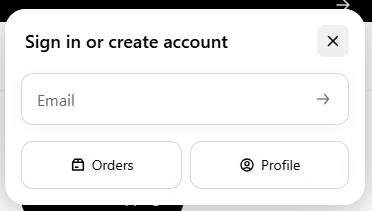
Customers open the account icon in the header. When you assign a menu, extra links can appear in this panel.

Sign in or create account panel with email field and Orders and Profile buttons

Storefront → header account icon → sign-in panel

Account navigation

Account links menu

Optional menu shown in the header account panel for signed-in customers.

Usage

  • Create a menu under Online Store → Navigation with links such as Orders and Profile
  • Choose Customer account main menu if your theme provides it, or pick any menu you built
  • Leave empty if you do not need extra shortcuts—the standard account area still works

Where it shows on the storefront

  • Header account icon → sign-in / account panel
Theme Settings

Social media

Social profile URLs and icon color for the footer.

Add only the networks you use—each URL shows its icon in the footer.

Start with Instagram or TikTok for fragrance and beauty brands, then add more when ready.

On your store

Icons appear in the footer when you add profile URLs below.

Footer info block with address, phone, email, and social icons

Storefront → footer → social icons

Icon color

Social media icon color

Color for all social icons that have a profile URL. Default color: #000000.

Usage

  • Match footer text or an accent from your color scheme
  • Icons only appear for networks where you entered a URL

Where it shows on the storefront

  • Footer and Store information social icon row
Theme Settings

Product cards

How product tiles look in collection grids, sliders, and recommendations.

Product cards are the tiles shoppers see before they open a product—image, badges, brand, title, and price.

Keep image shape and badges consistent so browsing feels orderly across collections.

On your store

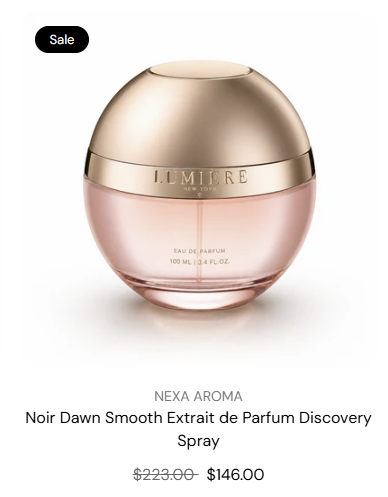
Typical tile in a collection grid—image, optional sale badge, brand, title, and price.

Product card with sale badge, brand name, product title, and prices

Storefront → collection grid → product card

Badges

Show sold out badge

Label on the product image when the variant cannot be purchased. Default: On

When turned on

  • Customers see “Sold out” without opening the product page.

When turned off

  • Unavailable products look the same as in-stock items until they click through.

Show sale badge

Label when the product has a compare-at price (on sale). Default: On

When turned on

  • Highlights promotions in collection grids.

When turned off

  • Sale pricing still shows in the price line if compare-at is enabled there.

Product image

Image background

Fill color behind the product photo on the card. Default color: #ffffff.

Usage

  • Use with Contain image fit so PNG bottles sit on a clean field
  • Match the section background or use a soft tint for lifestyle shots

Where it shows on the storefront

  • Product card image area in collection grids and sliders

Image blend mode

How the photo blends with the card background. Works best on light backgrounds and white-background JPGs. Default: Normal

Usage

  • Normal — standard product photo
  • Multiply — can soften white box edges on tinted backgrounds

Where it shows on the storefront

  • Product card image in grids and recommendation rows

Image shape

Aspect ratio crop for all product card images. Default: 1:1 Square

Usage

  • 1:1 Square — even grids for perfume and skincare
  • 4:5 Portrait — taller editorial product shots
  • Auto — Original — keeps each image’s native ratio (rows may vary in height)
  • Other ratios are available in the theme editor for specialty layouts

Where it shows on the storefront

  • Product card image on collection pages, featured collections, and recommendations

Image fit

How the image fills the card frame. Default: Cover

Usage

  • Cover — fills the frame; may crop edges
  • Contain — full product visible; may show background color

Where it shows on the storefront

  • Product card image area

Image corner radius

Uses your global border radius presets. Default: Medium radius

Usage

  • Pick a preset from Border radius—small through extra large
  • Keeps product tiles consistent with cards and media elsewhere

Where it shows on the storefront

  • Corners of product images on cards

Image padding

Space between the product photo and the card frame. Default: 0 px · You can choose 0 to 24 px

Usage

  • Add a few pixels when using Contain so bottles do not touch the card edge
  • Leave at 0 for edge-to-edge cover images

Product details

Show brand name

Brand (vendor) above the product title on the card. Default: On

When turned on

  • Shows the brand line—for example, the perfume house name.

When turned off

  • Title and price only on the card.

Show compare-at price

Original price when the product is on sale. Default: On

When turned on

  • Strikethrough compare-at beside the sale price.

When turned off

  • Only the current price shows on the card.

Show unit price

Unit pricing when Shopify has it for the variant (for example, per ml). Default: Off

When turned on

  • Shows under the main price when unit price data exists.

When turned off

  • Unit price is hidden on cards.

Product title

Color for the product name on the card. Default color: #111111.

Usage

  • Usually matches body or heading text from your color scheme

Where it shows on the storefront

  • Product title line on collection and recommendation cards

Product price

Color for price text on the card. Default color: #111111.

Usage

  • Can match title color or use an accent for emphasis

Where it shows on the storefront

  • Price line on collection and recommendation cards
Theme Settings

Product compare

Compare products side by side from collection and product grids.

Shoppers pick products from grids and view them in one table—helpful for similar scents, sizes, or routines.

Choose how many items they can compare and which rows appear, including optional metafields.

On your store — compare tray

Selected products appear in a tray at the bottom with a Compare button.

Compare tray with selected products

Storefront → compare tray

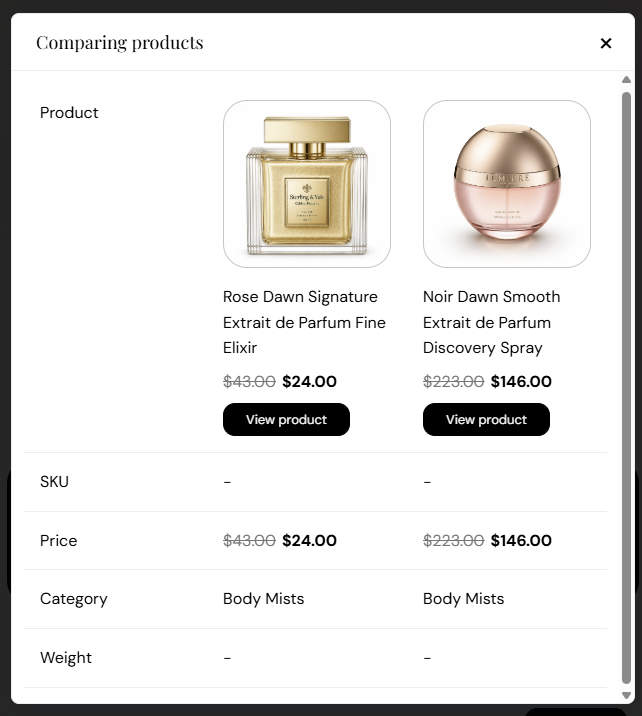
On your store — comparison table

Side-by-side table with the rows you enable below.

Compare modal with product rows

Storefront → compare modal

Compare feature and limit

Show product comparison

Compare checkboxes on product cards plus the tray and comparison table. Default: On

When turned on

  • Customers can select products and open a side-by-side compare view.

When turned off

  • Compare UI is hidden across the store.

Maximum products

How many products a customer can compare at once. Default: 4 · You can choose 2 to 4

Usage

  • Use 2–3 on mobile-heavy stores so the tray stays readable
  • 4 works well on desktop for fragrance or skincare ranges

Compare table content

Show SKU

Product SKU in the comparison table. Default: Show

Usage

  • Show — SKU row appears for each product.
  • Hide — SKU row is hidden.

Where it shows on the storefront

  • Compare modal — product comparison table

Show price

Current selling price in the table. Default: Show

Usage

  • Show — Price row appears for each product.
  • Hide — Price row is hidden.

Where it shows on the storefront

  • Compare modal — product comparison table

Show compare-at price

Original price when the product is on sale. Default: Show

Usage

  • Show — Compare-at price shows when set on the product.
  • Hide — Only the current price column is used.

Where it shows on the storefront

  • Compare modal — product comparison table

Show category

Product type or category when available. Default: Show

Usage

  • Show — Category row helps compare product families.
  • Hide — Category row is hidden.

Where it shows on the storefront

  • Compare modal — product comparison table

Show weight

Product weight when Shopify has it. Default: Show

Usage

  • Show — Useful for size or shipping comparisons.
  • Hide — Weight row is hidden.

Where it shows on the storefront

  • Compare modal — product comparison table

Custom comparison fields

Show metafields

Custom product metafields in the table. Default: Hide

Usage

  • Show — Adds rows for namespaces you list below.
  • Hide — Only standard rows appear.

Where it shows on the storefront

  • Compare modal — product comparison table

Metafield namespaces

Advanced. Comma-separated list of metafield namespaces to include.

Usage

  • Example: custom.fragrance_notes, custom.size
  • Only applies when Show metafields is set to Show
  • Metafields must exist on your products in Shopify admin

Where it shows on the storefront

  • Extra rows in the compare modal table
Theme Settings

Breadcrumbs

Choose which page types show a breadcrumb trail under the header. The home page never shows breadcrumbs.

Breadcrumbs help customers see where they are—for example, Home → Skincare → Product name.

Turn them on for deep pages like products and collections; turn off on minimal layouts if you prefer a cleaner header area.

Visibility by page type

Turn each option on or off to show a breadcrumb trail below the header on that page type. When on, shoppers see a short path (for example, Home → Skincare → Product name). Turn off any page type where you want a cleaner layout. The home page never shows breadcrumbs. Most options default to On. Page types: Products, Collections, Collection list, Cart, Blog, Blog posts, 404 page, Pages, Search.

Theme Settings

Cart page

Cart drawer or page, header cart badge, line-item options, and Shop Pay installment messaging.

Control how customers review items before checkout—drawer or full page, badge colors, and what each line shows.

Most cart text and buttons still follow your color schemes.

Cart behavior and icon badge

Cart style

How the cart opens when customers tap the bag icon in the header. Default: Cart page

Usage

  • Cart page — goes to a full cart page
  • Cart drawer — opens a side panel so they stay on the current page

Where it shows on the storefront

  • Header cart icon

Badge background

Background of the item count on the cart icon. Default color: #000000.

Usage

  • Use a strong contrast so the count is easy to see on the header

Where it shows on the storefront

  • Header cart icon count pill

Badge text

Color of the number on the cart count pill. Default color: #FFFFFF.

Usage

  • Pair with badge background for clear contrast

Where it shows on the storefront

  • Header cart icon count pill

Cart features and installment messaging

Show brand name

Brand on each line item in the cart. Default: Off

When turned on

  • Shows vendor/brand under the product title in cart lines.

When turned off

  • Product title only on each line.

Allow order notes

Box for gift messages or delivery instructions. Default: Off

When turned on

  • Customers can leave a note before checkout.

When turned off

  • No order note field in cart.

Show discount code field

Field to enter a discount code in cart. Default: Off

When turned on

  • Customers apply codes before checkout.

When turned off

  • Discount codes are entered at checkout only.

Show express checkout buttons

Shop Pay and other accelerated checkout buttons in cart. Default: On

When turned on

  • Faster checkout for returning customers.

When turned off

  • Standard checkout button only.

Show compare-at price

Original price on sale line items. Default: On

When turned on

  • Strikethrough compare-at beside sale price in cart.

When turned off

  • Current price only on each line.

Show unit price

Unit pricing on line items when Shopify provides it. Default: Off

When turned on

  • Shows per-unit price under the line total when available.

When turned off

  • Unit price hidden in cart.

Show on product page

Shop Pay installments message on the product page. Default: On

When turned on

  • Shows pay-over-time messaging when Shop Pay offers it.

When turned off

  • No installments message on the product page.

Show in cart

Shop Pay installments message in the cart. Default: On

When turned on

  • Shows pay-over-time messaging in cart when available.

When turned off

  • No installments message in cart.
Theme Settings

Follow on Shop

Show the Follow on Shop button so customers can follow your store in the Shop app.

Lets customers follow your store in the Shop app for updates and offers.

Requires the Shop channel and Shop Pay. Button colors are set by Shopify, not in the theme editor.

Follow on Shop

Turn on one or more placements. You can use the footer bottom and the Store information block together.

Show in Drawer navigation

Button below the three menus in the mobile drawer. Default: Off

When turned on

  • Follow on Shop appears at the bottom of the mobile menu.

When turned off

  • Not shown in the drawer.

Show in Footer — Store information block

Shows inside a Store information block when you add that block to the footer. Default: Off

When turned on

  • Add a Store information block in the footer section, then enable this setting.

When turned off

  • Not shown in that block.
Theme Settings

Custom CSS

Adds custom styles to your entire online store.

Add your own style rules when a setting does not exist—for small tweaks by you or your developer.

Rules apply storewide. Use the preview before you publish.

Custom CSS

For merchants comfortable with CSS.

CSS

Paste CSS to adjust styles across your entire online store.

Usage

  • Example: .card { border-radius: 30px; }
  • See Shopify’s custom CSS guide for limits
  • Test in the theme preview before publishing—broken rules can affect layout sitewide