Shopify Pages

Collection Page

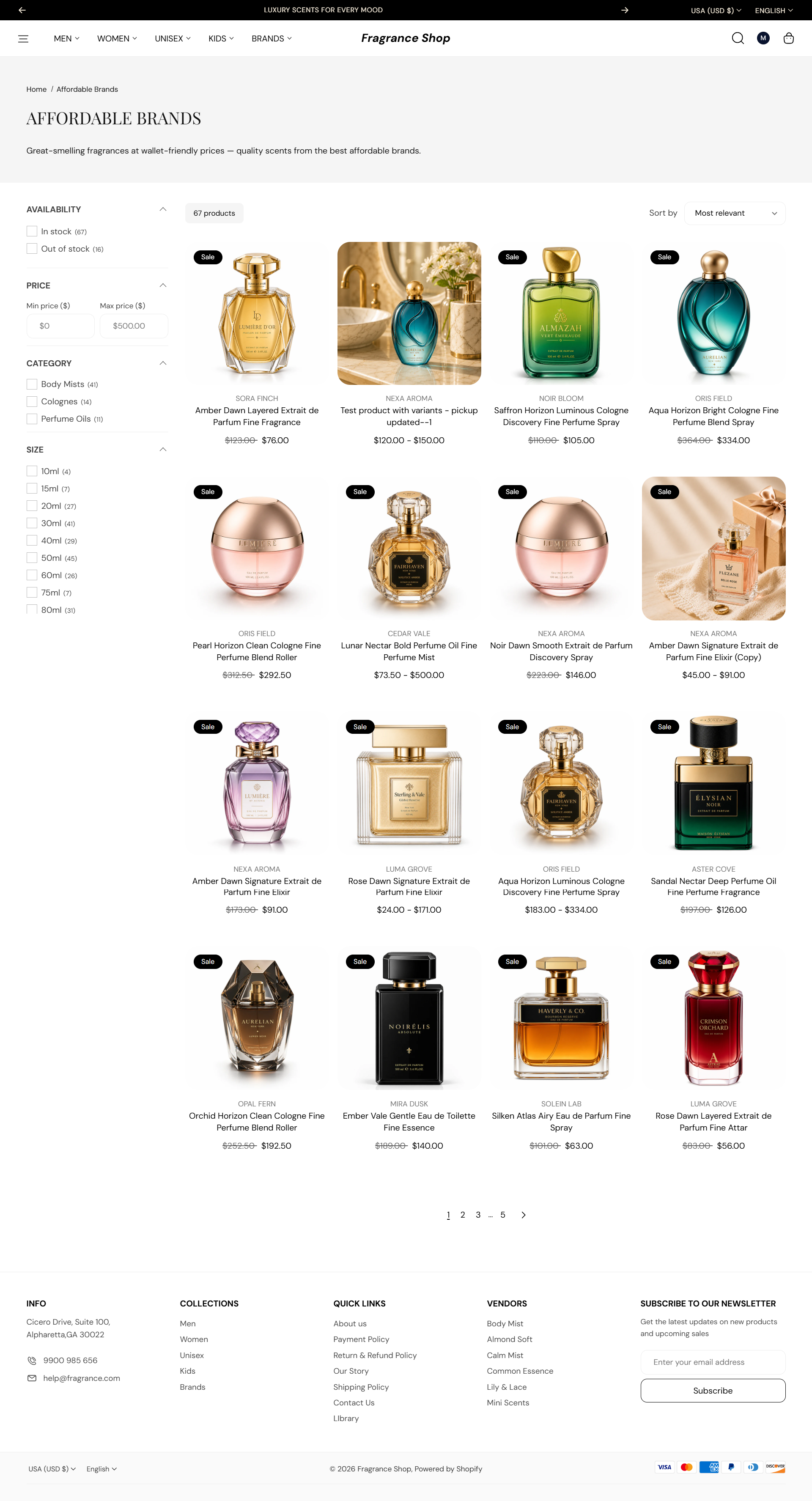
The Collection page shows products from one collection—a banner at the top and a filterable grid below. Edit collection names and descriptions in Shopify admin; style the banner and grid in the theme editor.

Storefront preview

Fragrance Shop collection page with banner and product grid

Storefront → Collection page

How to open this page

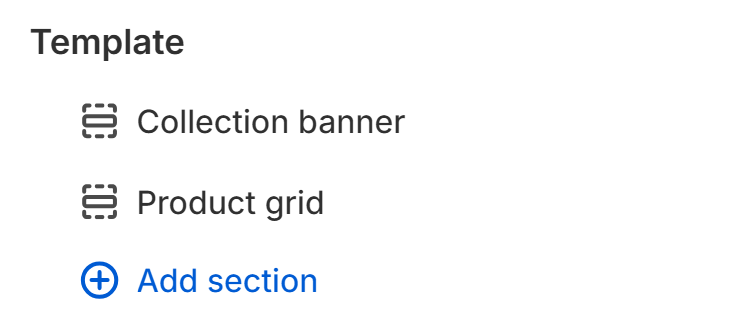
Collection page template with Collection banner and Product grid sections

Theme editor → Collection page → Template

Collection banner — Content

Show breadcrumbs

Shows breadcrumb links above the collection title in the banner. Default: On

Usage

  • Turn on to help customers navigate back to the home page or collections list.
  • Turn off for a cleaner banner when the collection title is enough context.

Show description

Shows the collection description from Shopify admin below the title. Default: On

Usage

  • Turn on when your collection descriptions add useful context for shoppers.
  • Edit descriptions under Products → Collections in Shopify admin.

Collection banner — Background

Use collection image as background

Uses the collection's featured image as the banner background. Default: On

Usage

  • Turn on for a visual hero behind the collection title.
  • Recommended image size: about 1920 × 400 px or wider.
  • Turn off to use only the background color below.

Background color

Sets the banner background when no collection image is shown or the image is hidden. Default color: #F5F5F5

Usage

  • Pick a soft tint that pairs with your heading and breadcrumb colors.

Collection banner — Banner height

Collection banner layout

Chooses how the banner height is calculated. Default: Adaptive height

Usage

  • Pick Adaptive height to size the banner from its content with a minimum height.
  • Pick Fit to collection banner image to scale from the collection image ratio while respecting minimum height.

Desktop minimum height

Sets the shortest height the banner can be on large screens. Default: 200 px

Usage

  • Raise it for a taller hero; lower it for a compact title bar.

Mobile minimum height

Sets the shortest height the banner can be on phones. Default: 100 px

Usage

  • Preview on mobile to confirm the title and breadcrumbs still read clearly.

Collection banner — Colors

Heading color

Sets the color of the collection title in the banner. Default color: #111111

Usage

  • Choose a color with enough contrast against the banner background or image.

Breadcrumb color

Sets the color of breadcrumb links in the banner. Default color: #111111

Usage

  • Match or soften relative to the heading color so the trail stays readable.

Section spacing

Section spacing

Adds empty space above and below this section on desktop and mobile.

Usage

  • Top padding (desktop) — Default: 40 px · 0–100 px
  • Bottom padding (desktop) — Default: 40 px · 0–100 px
  • Top padding (mobile) — Default: 40 px · 0–100 px
  • Bottom padding (mobile) — Default: 40 px · 0–100 px
  • When you move the slider, the gap above or below grows or shrinks

Product grid

Products per page

Sets how many products appear before pagination. Default: 16 · Range: 8–48 · Step: 4

Usage

  • Use fewer products per page for faster loads on large catalogs.
  • Use more when you want fewer pagination clicks.

Columns on desktop

Sets how many product cards appear per row on large screens. Default: 4 · Options: 2–5

Usage

  • Use fewer columns when product titles or badges need more room.

Columns on tablet

Sets how many product cards appear per row on tablet-sized screens. Default: 3 · Options: 2–4

Usage

  • Match your search results grid if you want a consistent browse experience.

Columns on mobile

Sets how many product cards appear per row on phones. Default: 2 · Options: 1–2

Usage

  • Use 1 column for larger product images on small screens.

Product grid — Filtering and sorting

Filters

Shows filter options in the collection sidebar or drawer. Default: On

Usage

  • Customize available filters in the Search and Discovery app in Shopify admin.
  • Turn off for a simpler grid without facets.

Sorting

Shows a sort dropdown so customers can reorder products. Default: On

Usage

  • Helpful on large collections where customers want price or best-selling order.

Show filter group on active filter chips

Adds the filter group name to each active chip, such as Color: Red. Default: Off

Usage

  • Turn on when several filters could share similar labels.
  • Leave off for shorter chips when filter names are already clear.

Section spacing

Section spacing

Adds empty space above and below this section on desktop and mobile.

Usage

  • Top padding (desktop) — Default: 40 px · 0–100 px
  • Bottom padding (desktop) — Default: 40 px · 0–100 px
  • Top padding (mobile) — Default: 40 px · 0–100 px
  • Bottom padding (mobile) — Default: 40 px · 0–100 px
  • When you move the slider, the gap above or below grows or shrinks