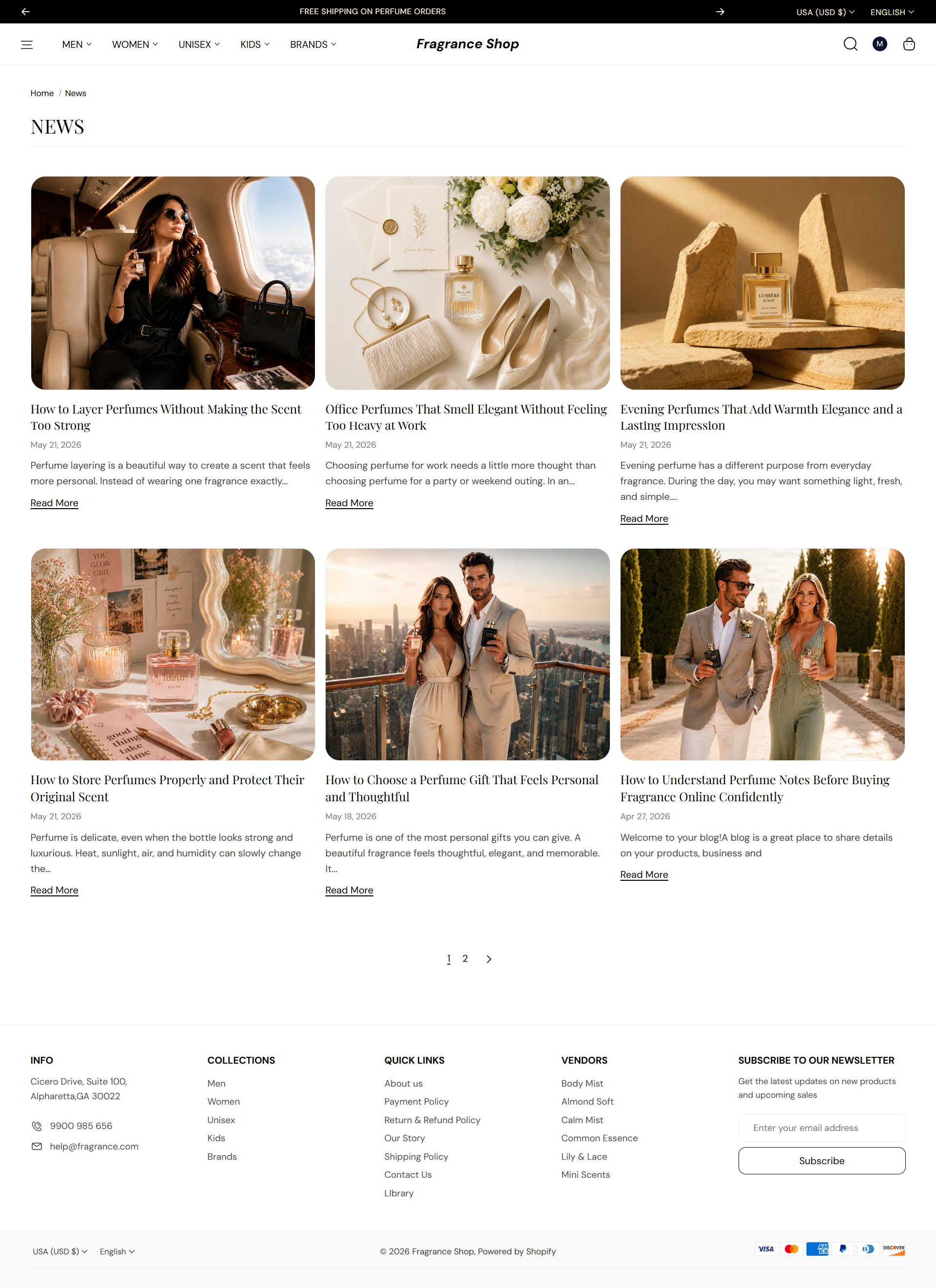

Article content
Articles per page
Sets how many posts appear before pagination. Default: 6 · Range: 2–24
Usage
- Use a lower number for editorial blogs with long excerpts.
- Use a higher number when you publish frequently and want fewer page clicks.
Show published date
Shows when each article was published on the card. Default: On
Usage
- Turn on for news, launches, or seasonal content where timing matters.
- Turn off for evergreen guides that should not feel dated.
Show blog comment count
Shows how many comments each article has received. Default: Off
Usage
- Turn on if you enable comments and want to highlight active discussions.
Show author name
Shows the author credited on each article card. Default: Off
Usage
- Turn on for expert-led content or multi-author editorial blogs.
Excerpt word count
Sets how many words appear in each article preview before the read-more link. Default: 20 · Range: 10–80
Usage
- Lower the count for a tighter grid with shorter cards.
- Raise it when you want more context before customers open the full article.
Show read more link
Adds a link below each excerpt that opens the full article. Default: On
Usage
- Turn off if the whole card is already clickable and you want a cleaner layout.
Read more link label
Sets the text on the read-more link. Default: Read More
Usage
- Try Read article or Discover more to match your brand voice.
- Leave blank only if Show read more link is turned off.